
iMagic Software has released version 5.73 of iMagic Inventory, giving customers a more reliable way to handle shipping addresses on invoices. The update also adds a Change Tax Rate option for invoices and a Quote filter on three reports.
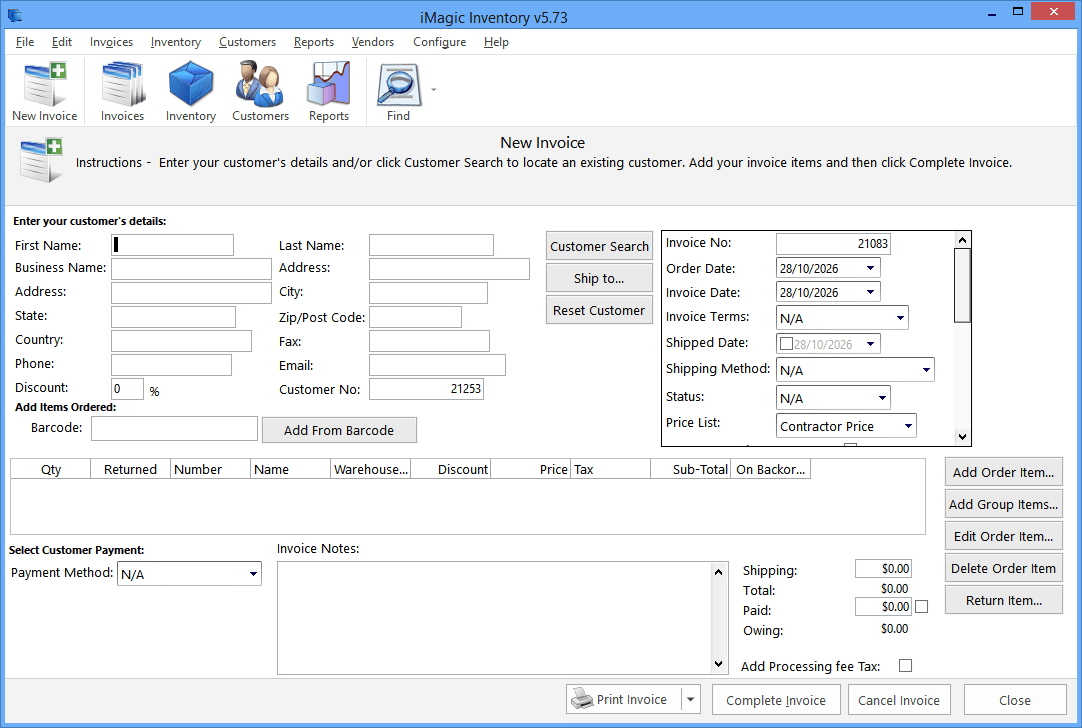
The New Invoice screen in iMagic Inventory v5.73, with the Ship to button beside the customer details.
Shipping addresses stay with the invoice
Shipping addresses are now associated with a specific invoice instead of the customer record. A customer can have more than one shipping address, and changing the address on one invoice no longer changes it on other invoices for the same customer.
For a business that ships the same customer’s orders to different sites, each invoice keeps the address it was created with.
Change the tax rate on an invoice
A new option under Invoices > This Invoice > Change Tax Rate lets you change the tax rate for an invoice together, instead of adjusting it item by item.
Quote filter on reports
The Customer Summary, Statement and Sales Reports now include a Quote filter.
Database update and the v6 Beta
This release updates the database to version 63. The v6 Beta of iMagic Inventory is also available. Customers who would like to try it, or who want to request features or updates, can contact iMagic Software and a link to install it will be sent.
Availability
Version 5.73 is available now. Existing customers can install it from within the software by selecting Help > Check Web for Updates. The full release notes are on the iMagic Inventory version 5.73 page, and the free trial can be downloaded from the iMagic Inventory download page.
About iMagic Software
iMagic Software builds business and reservation management software, including iMagic Inventory, for retailers, manufacturers, fulfillment houses and other businesses that track stock.
Press contact
iMagic Software Press press@imagicsoft.com
